Published

danyal.dk
Published
Related Posts
-

Completely remove or uninstall MySQL from Ubuntu
Published
-

Laravel composer install – Your requirements could not be resolved to an installable set of packages.
Published
-

Lumen 5.8 activity log composer package
Published
-

Connect Laravel to remote MySql DB with SSH
Published
-

Vuejs: Rule proposition of order-in-components
Published
How to Create a Script Element in JavaScript?
Quick tip of the day, in this post we will see how to add a script to the page head dynamically.
For example, at danyal.dk I am not using moment.js library, and in order to present hot to add a js library dynamically to the HTML.
Consider the following HTML markup: index.html
Coding Beauty Tutorial
Here’s how we can use JavaScript to create a script element in the HTML:
- Use the
document.createElement()method to create thescriptelement. - Set the
srcattribute on the element object to a script file. - By setting the
asyncproperty totrue, the browser won’t have to load and evaluate the script before continuing to parse the HTML. Instead, the script file will be loaded in parallel to reduce delays and speed up the processing of the page. - Our page listens for the
onloadevent in order to perform an action when the script file has been loaded successfully. - Our page also listens for the
onerrorevent so that we can perform a different action in case there was an error with loading the script. - Include the script element in the HTML using the
appendChild()method.
app.js
const script = document.createElement('script');

script.src =
  'https://cdnjs.cloudflare.com/ajax/libs/moment.js/2.29.4/moment.min.js';

script.async = true;


script.onload = () => {
  console.log('moment.js script is loaded successfuly');
  console.log(moment().format('MMMM Do YYYY, h:mm:ss a'))
};

script.onerror = () => {
  console.log('Error occurred while loading script');
};

document.body.appendChild(script);
Script execution in browser console & outcome
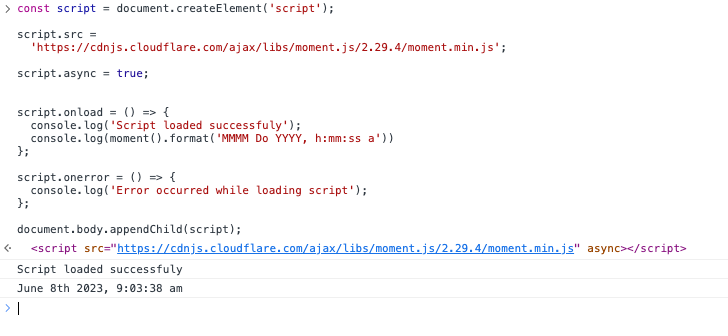
That’s how you can add a javascript remote or local script to the HTML DOM.
Cheers, see you in the next post!